

Internal linking plays a major role in SEO, but manually adding links to every blog post can be exhausting, inconsistent, and time-consuming. The good news is that AI tools now make it possible to generate internal links automatically—saving hours of work while improving your website structure, rankings, and user experience.
- What is Internal Linking and Why It Matters
- Why Use AI Tools for Internal Linking Automation
- Best AI Tools to Generate Internal Links Automatically
- How to Generate Internal Links Automatically Using AI Tools (Step-by-Step)
- Free Ways to Generate Internal Links Using AI
- Best Practices for AI-Based Internal Linking
- Common Mistakes to Avoid When Using AI Internal Linking Tools
- FAQs (People Also Ask)
In this complete guide, you’ll learn how to generate internal links automatically using AI tools, which tools work best, practical steps to apply automation, and how to avoid mistakes that can harm your SEO.
What is Internal Linking and Why It Matters
Internal links are simply links from one page of your website to another. While they may look simple, they are extremely important for SEO and usability.
Here’s why internal links matter:
- They help Google crawl and index your website more efficiently.
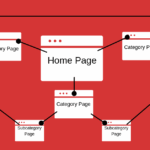
- They create a clear content structure that improves topic authority.
- They reduce bounce rate and increase user engagement.
- They help boost rankings for specific pages by distributing link equity.
- They guide readers to relevant information and improve user experience.
Without an organised internal linking structure, even high-quality content can underperform. This is why bloggers, small business owners, SEO professionals, and content creators now rely on AI tools to automate the entire process.
Why Use AI Tools for Internal Linking Automation
Manually adding internal links to every new and existing article can feel overwhelming. You must analyse pages, search for relevant articles, choose the right anchor text, and insert links without over-optimising. AI tools solve all of this instantly.
Here’s how AI contributes to faster, better internal linking:
- It scans your entire website and identifies relevant internal link opportunities.
- It uses semantic analysis to match anchor texts with suitable pages.
- It automatically inserts links without needing manual editing.
- It prevents duplicate or irrelevant linking.
- It maintains a natural link density.
- It saves hours of manual effort every week.
AI makes internal linking smarter, faster, and more accurate—especially for websites with large content libraries.
Best AI Tools to Generate Internal Links Automatically
There are several AI-powered tools designed specifically for internal linking automation. Below are some of the most effective ones.
LinkWhisper
LinkWhisper is one of the most well-known AI internal linking plugins for WordPress. It analyses your posts, understands the context, and automatically suggests relevant internal links.
Key features include:
- One-click internal link suggestions
- Automated internal link insertion
- Bulk linking for older posts
- Anchor text recommendations
- Reports to find orphan pages
It works especially well for bloggers and content-heavy websites.
LinkStorm
LinkStorm is an AI tool designed for large content sites. It builds internal link clusters by analysing the meaning and topical relationships between pages.
Main capabilities include:
- Semantic link discovery
- Cluster-based linking
- Auto-generated anchor variations
- Smart grouping for topical authority
It’s an excellent choice if your website focuses heavily on content strategy.
LinkBoss
LinkBoss is an advanced AI linking tool that helps websites build topical authority through strategic linking.
What it offers:
- AI-generated internal link suggestions
- Anchor diversity
- Topical mapping
- Deep linking to strengthen content clusters
It’s useful for SEO professionals and site owners who want both automation and strategy.
Autolinking AI Tools
Autolinking tools use machine learning to detect keywords or topics across your website and add links automatically. These are ideal if you want:
- Keyword-based linking
- Auto-placement in large content libraries
- Simple internal linking for bloggers
This category includes multiple tools that follow the same automated linking principle.
AI Internal Linking Tools (Free Options)
Free AI link generators exist, though they offer limited features compared to paid tools. They allow you to analyse content and generate internal link suggestions without cost.
Common limitations include:
- Manual insertion required
- Limited monthly scans
- Restricted number of suggestions
Free AI linking tools can work for small sites or beginners, but eventually you’ll need a more powerful solution.
How to Generate Internal Links Automatically Using AI Tools (Step-by-Step)
Here’s the complete workflow for automating internal linking using AI tools.
Step 1 — Scan Your Website
The first step is letting the AI tool crawl your website. During scanning, the tool analyses:
- All published pages
- Content structure
- Keyword usage
- Topical relationships
- Existing internal links
This gives the AI a complete understanding of your site before suggesting improvements.
Step 2 — Identify Link Opportunities
AI tools use natural language processing (NLP) to compare your content and recommend the most relevant linking opportunities.
They identify:
- Sentences where links fit naturally
- Anchor text that matches the target page
- Contextually relevant connections
- Pages that need more internal links
This eliminates guesswork and ensures accuracy.
Step 3 — Approve and Insert Links Automatically
Most AI tools give you two options:
- Automatic insertion
- Manual approval
With auto-insertion, links are added instantly across your website. With manual approval, you can choose which links to keep or edit before they go live.
This flexibility helps you maintain SEO quality while saving time.
Step 4 — Track and Improve Internal Linking Structure
AI tools also provide reporting dashboards that help you monitor:
- Orphan pages
- Excessively linked pages
- Missing link opportunities
- Anchor text distribution
This ensures your internal linking remains balanced and optimised.
Free Ways to Generate Internal Links Using AI
If you’re working with a limited budget, you can still generate internal links automatically using free AI resources.
Here are some effective ways:
- Use free AI content analysis tools to identify potential anchors.
- Generate internal linking plans using free AI writing tools.
- Use limited free versions of internal linking plugins.
- Use AI to summarise pages and find semantic relationships manually.
These methods take more effort than premium tools but still help automate a large part of the process.
Best Practices for AI-Based Internal Linking
Even with AI automation, you must follow internal linking guidelines to avoid SEO issues.
Here are essential best practices:
- Use natural, context-based anchor texts.
- Ensure the linked pages are topically relevant.
- Do not overuse exact-match keyword anchors.
- Maintain a balanced linking pattern across your site.
- Update your internal links whenever you publish new content.
- Create pillar pages and supporting cluster articles.
- Regularly review AI-generated links for accuracy.
When done correctly, AI linking boosts both SEO and user experience.
Common Mistakes to Avoid When Using AI Internal Linking Tools
Using AI tools without proper control can lead to mistakes. Here are common issues to avoid:
- Adding too many internal links in one article
- Using the same anchor text repeatedly
- Linking irrelevant pages
- Allowing AI to completely automate without review
- Creating keyword stuffing through over-optimised anchors
Avoiding these mistakes ensures a safe, effective internal linking strategy.
FAQs (People Also Ask)
What is the best AI tool for internal linking?
The best AI internal linking tools depend on your needs. LinkWhisper and LinkBoss are great for WordPress blogs, while LinkStorm works well for large content websites.
Can AI generate internal links automatically for free?
Yes, some free AI tools can analyse content and suggest internal links, but the automation is limited. Paid versions offer full auto-linking and better accuracy.
Is AI internal linking safe for SEO?
Yes, AI internal linking is safe when done correctly. Ensure links are contextually relevant and reviewed before publishing.
How many internal links should a page have?
There is no fixed number. Add internal links whenever they help users and improve content flow. Avoid excessive linking.
Do AI tools help improve Google rankings?
Yes. AI internal linking improves crawlability, distributes link authority, and strengthens topical relevance, all of which contribute to better rankings.
To help readers learn more about SEO and blogging strategies